
菲尔德沃克斯精简版
由: SIL
菲尔德沃克斯精简版(FieldWorks Lite)是一款为菲尔德沃克斯词典项目设计的轻量级词汇应用程序,旨在快速易用。
菲尔德沃克斯精简版的设计目标是:
菲尔德沃克斯精简版仍处于开发的早期阶段,目前仅具备一组基本功能。虽然我们有许多想法,但我们非常希望听到您认为有用的功能。启动应用程序时,右上角有一个反馈按钮;我们很乐意听到您的想法。
- 跨平台:目前支持Windows、Android和Linux(Alpha),iOS和Mac版本正在开发中
- 离线可用:无需互联网连接
- 协作:可实时查看其他用户的更改
- 历史记录:允许您查看项目中每个词条的完整历史记录
屏幕
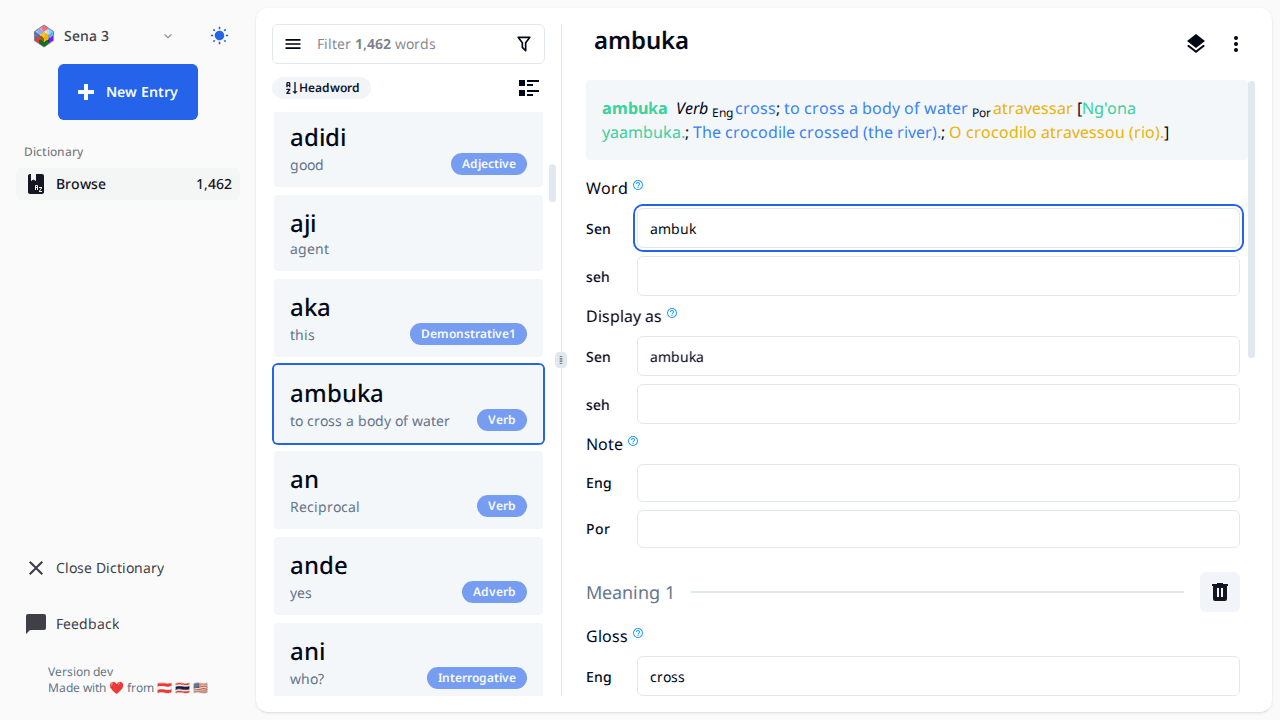
- Make sure your data is backed up first if it's important. If you use Lexbox S/R, then your data is already backed up and you're good.
- The landing page should have a list of all your FW projects (right now it's hard coded to list each folder in 'C:ProgramDataSILFieldWorksProjects'), click the open button with the FW icon and it will open the editor on the page.
- When working with this editor all changes are saved automatically once you finish editing a field (once the text field loses focus)
- All entries created will have the Morph type of stem
- The FW project will be locked while using this tool, meaning you can't open the project in FieldWorks while you have it open in FW Lite. There is a button to open an entry in FW, this will close the project in FW Lite, and launch FW using the link to entry feature in FW.
- To get a new project or S/R changes to a project, open FieldWorks and do it there.
- FW Lite supports editing Entry, Sense, and Example Sentences. Some things like Part of Speech and Semantic domains are supported on Sense. If you want to change the name of a part of speech or add a new one that must be done from within FieldWorks.
- There are buttons to reorder senses and example sentences, however those changes don't get saved right now.
- Sorting of entries is by headword, we may consider adding other sort options in the future
- The little book button to the left of the filter bar shows a list of exemplar characters and will let you filter by those.