
Fieldworks Lite
FieldWorks Lite ni programu tumizi la kiambatanisho cha lexicon kilichopunguzwa kwa ajili ya miradi ya kamusi ya FieldWorks ambayo inalenga kuwa haraka na rahisi kutumia.
FieldWorks Lite imeundwa kuwa:
FieldWorks Lite bado iko katika hatua ya awali ya maendeleo na ina seti ya msingi ya vipengele tu. Ingawa tuna mawazo mengi, tungependa sana kusikia ni vipengele gani vitakavyo kuwa muhimu kwako. Unapoanzisha programu, kuna kitufe cha maoni kilicho juu kulia; tungependa kusikia mawazo yako.
- Mtambuka-jukwa: kwa sasa Windows, Android na Linux (Alpha) na iOS na Mac katika maendeleo
- Inaweza kutumika bila muunganisho wa intaneti: hakuna muunganisho wa intaneti unahitajika
- Shirikishi: tazama mabadiliko ya moja kwa moja kutoka kwa watumiaji wengine
- Inayojua historia: inakuruhusu kutazama historia kamili ya kila ingizo katika mradi wako
Skrini
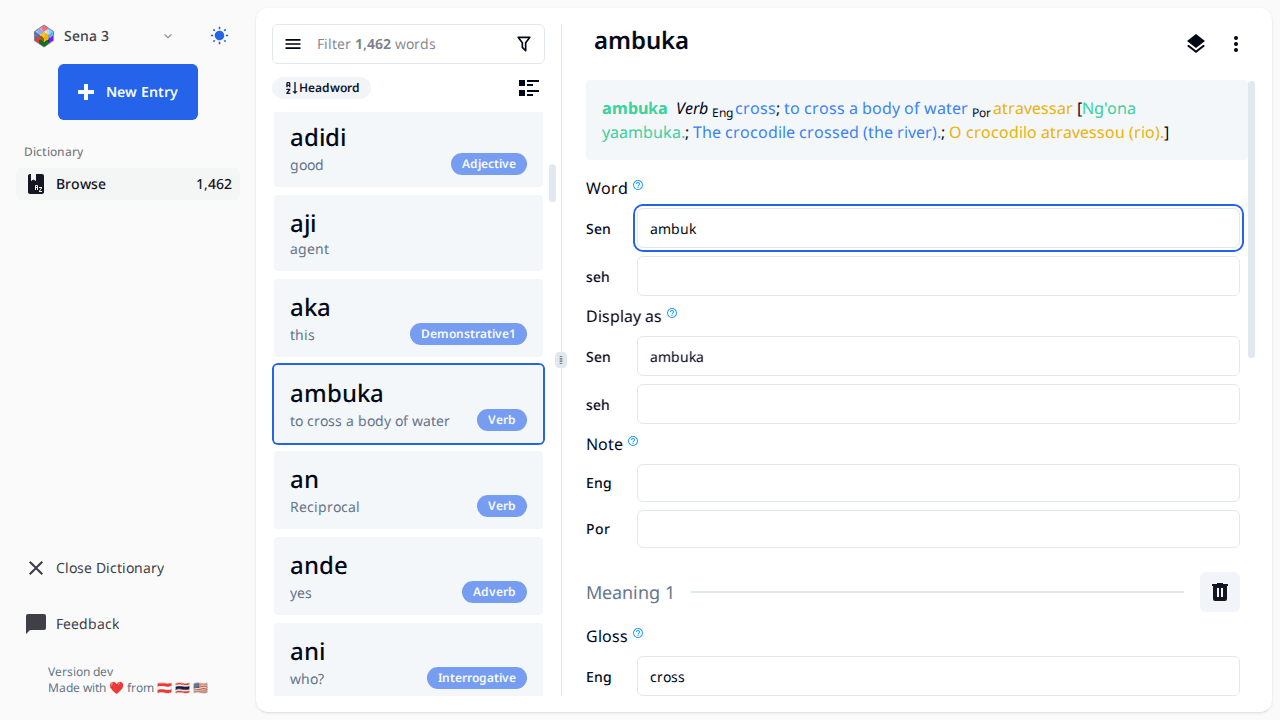
- Make sure your data is backed up first if it's important. If you use Lexbox S/R, then your data is already backed up and you're good.
- The landing page should have a list of all your FW projects (right now it's hard coded to list each folder in 'C:ProgramDataSILFieldWorksProjects'), click the open button with the FW icon and it will open the editor on the page.
- When working with this editor all changes are saved automatically once you finish editing a field (once the text field loses focus)
- All entries created will have the Morph type of stem
- The FW project will be locked while using this tool, meaning you can't open the project in FieldWorks while you have it open in FW Lite. There is a button to open an entry in FW, this will close the project in FW Lite, and launch FW using the link to entry feature in FW.
- To get a new project or S/R changes to a project, open FieldWorks and do it there.
- FW Lite supports editing Entry, Sense, and Example Sentences. Some things like Part of Speech and Semantic domains are supported on Sense. If you want to change the name of a part of speech or add a new one that must be done from within FieldWorks.
- There are buttons to reorder senses and example sentences, however those changes don't get saved right now.
- Sorting of entries is by headword, we may consider adding other sort options in the future
- The little book button to the left of the filter bar shows a list of exemplar characters and will let you filter by those.