
Fieldworks Lite
FieldWorks Lite is a slimmed down companion lexical application for FieldWorks dictionary projects that's aimed at being fast and easy to use.
FieldWorks Lite is designed to be:
- Cross-platform: currently Windows, Android and Linux (Alpha) with iOS and Mac in progress
- Usable offline: no internet connection required
- Collaborative: watch live changes from other users
- History-aware: enabling you to view the complete history of every entry in your project
FieldWorks Lite is still in an early stage of development and only has a basic set of features. While we have a lot of ideas, we'd be very interested to hear what features you would find useful. When you launch the app there's a Feedback button in the top right; we'd love to hear your thoughts.
Screens
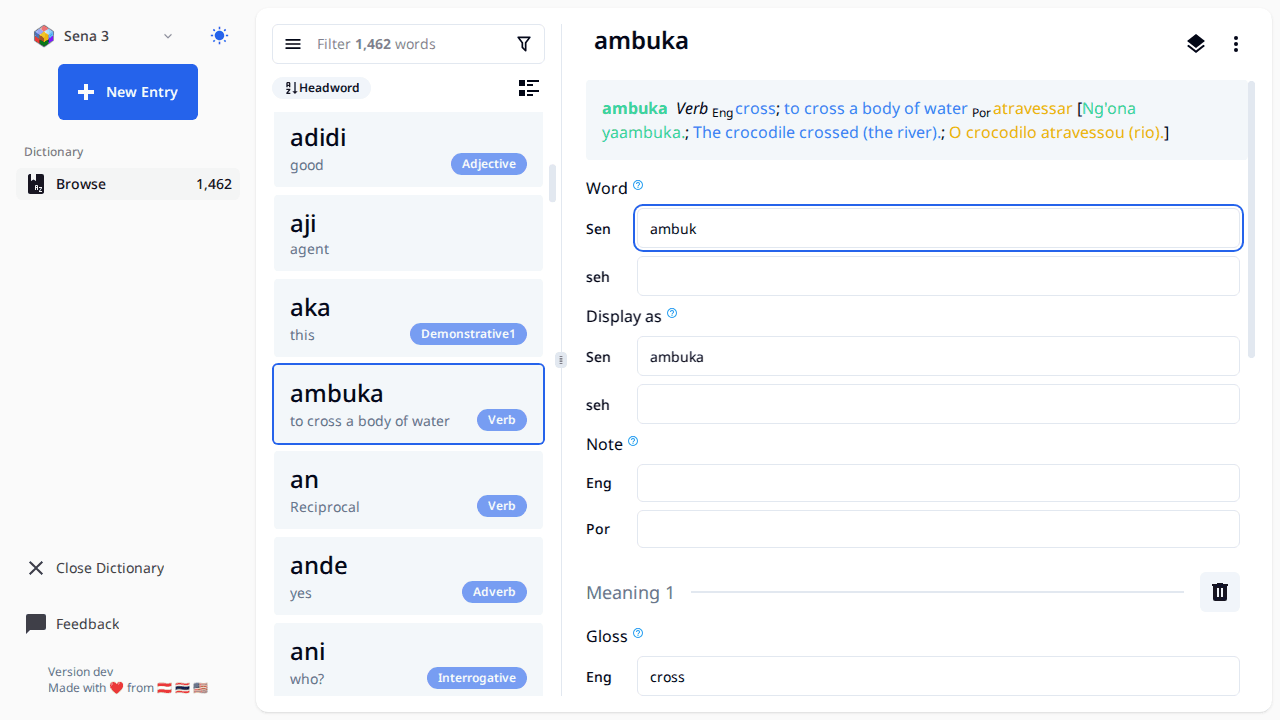
- Make sure your data is backed up first if it's important. If you use Lexbox S/R, then your data is already backed up and you're good.
- The landing page should have a list of all your FW projects (right now it's hard coded to list each folder in 'C:ProgramDataSILFieldWorksProjects'), click the open button with the FW icon and it will open the editor on the page.
- When working with this editor all changes are saved automatically once you finish editing a field (once the text field loses focus)
- All entries created will have the Morph type of stem
- The FW project will be locked while using this tool, meaning you can't open the project in FieldWorks while you have it open in FW Lite. There is a button to open an entry in FW, this will close the project in FW Lite, and launch FW using the link to entry feature in FW.
- To get a new project or S/R changes to a project, open FieldWorks and do it there.
- FW Lite supports editing Entry, Sense, and Example Sentences. Some things like Part of Speech and Semantic domains are supported on Sense. If you want to change the name of a part of speech or add a new one that must be done from within FieldWorks.
- There are buttons to reorder senses and example sentences, however those changes don't get saved right now.
- Sorting of entries is by headword, we may consider adding other sort options in the future
- The little book button to the left of the filter bar shows a list of exemplar characters and will let you filter by those.